Project : step 2
Culture boxes and nutrients
Disclaimer: the automatically generated English translation is provided only for convenience and it may contain wording flaws. The original French document must be taken as reference!
Goal: To implement the environment in which our future bacteria will evolve. This will essentially involve culture boxes in which nutrients will grow.
Required concepts: classes, constructors/destructors, operator overloading, inheritance
These concepts are explained in lessons 16, 17, 18 & 19Required files : partie2.zip
Setup
The archive provided for this step contains a new version of the file CmakeLists.txt which allows you to compile the material in this section. It also contains :
- the files src/Config.hpp/cpp containing, in particular, the definition of a number of useful constants ;
- new resources in the folder res;
- a simulation kernel src/Application.[hpp][cpp] from which all your graphical simulation tests will be derived;
- new test programmes in the folder src/Tests.
As in the previous step, method prototypes and attribute declarations will be located in a file with the .hpp extension, while their definitions will be located in a file with the .cpp extension.
You must proceed in this manner throughout the project.
(If you do not choose this option, you will need to adapt the test files provided yourself).General description of the classes to be produced
At this stage, we will begin by modelling the environment in which our future microorganisms will develop. We could simply model a single culture dish, but we will instead adopt a more general approach from the outset, enabling us to conduct several experiments simultaneously, using different culture dishes.
We will therefore start by modelling :
- the concept of a culture dish. This is the environment in which the microorganisms will evolve. You will grow nutrients generated at random locations in it;
- the laboratory (very basic). For now, this class will simply model the support on which the dishes are placed.
At this stage, you will begin to use your first graphical applications. A class Application.[hpp][cpp] is provided; it will serve as the basis for all your graphical simulation tests.
To summarise, here is the architecture you should have achieved at the end of this stage :
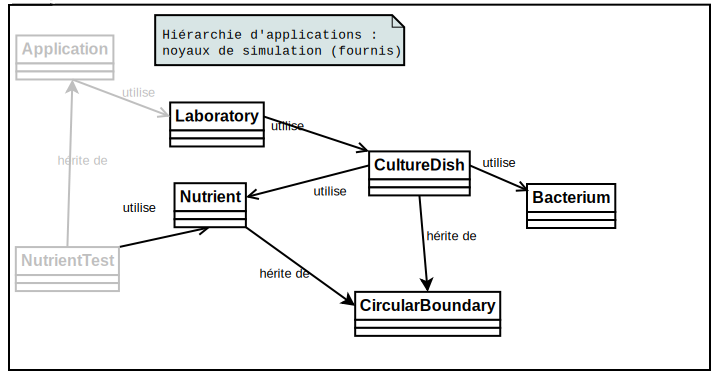
Let us now proceed to the beginning of the coding. In your programme, you will ensure that your classes are properly encapsulated, in particular by not giving public or protected access to your attributes. You will also systematically provide destructors.
The descriptions suggested below are minimal. This is a first draft that we will refine as the project progresses. You are also free to add any additional methods and attributes that you deem necessary.
Modules to be programmed
The parts (modules) to be implemented to complete this stage are as follows :
This stage does not present any major difficulties from a programming point of view. However, it will require you to make an effort to understand how the different "pieces of the puzzle" you need to complete fit together and to grasp the usefulness of the tools provided.
At the end of this stage, you will have a simulation environment where you can place nutrients in random locations in several culture boxes and watch them grow automatically :
|
← Manual addition of nutrient sources (using a key), nutrient growth based on temperature and management of multiple boxes, only one of which is visible at a time. |
Back to main document