Project: step 2.3
Wanderings
Disclaimer: the automatically generated English translation is provided only for convenience and it may contain wording flaws. The original French document must be taken as reference!
Goals:
- more concrete animals are making their appearance;
- they wander aimlessly and chase the targets they see
The class Animal
We have, through the class ChasingAutomaton, a rudimentary version of an "animal" capable of moving towards a target. The goal now is to turn it into an Animal and to refine its behavior a bit.
Specifically, an Animal will have a behavior very similar to a ChasingAutomaton, with the following difference:
- that it only pursues a target if the latter is in its field of vision;
- and in the absence of a visible target, it wanders randomly in its environment.
You can therefore start by taking over in Animal all the methods and attributes of the class ChasingAutomaton, being careful to modify the names of constructors and destructors.
Field of vision
To model the field of vision, we will equip the animal with three additional characteristics to represent:- the angle θ (in radians) characterizing its field of vision (a double);
- the maximum distance at which it can see (a double).
As with some of the features of the ChasingAutomaton, we will ensure that these features are returned by methods:
- getViewRange() which will return the constant ANIMAL_VIEW_RANGE (viewing angle);
- getViewDistance() which will return the constant ANIMAL_VIEW_DISTANCE (maximum distance for the field of vision).
The constructor of Animal will of course be updated to initialize the animal's radius to ANIMAL_RADIUS.
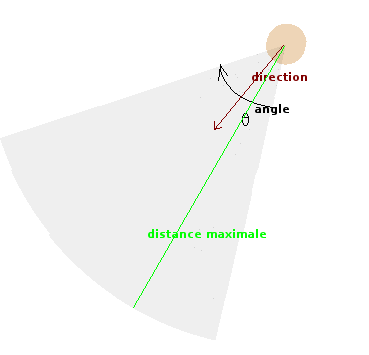
You will provide your animal class with the following methods related to the direction vector:
- getRotation returning the angle of the direction vector in polar coordinates (method angle of vec2d);
- setRotation(angle) updating the direction vector for a rotation of angle of the animal (the direction vector will simply be {cos(angle), sin(angle)}).
[Question Q2.7] Why do you think it is preferable to declare the method setRotation (and by the same reasoning a potential method setPosition of Collider) as protected?
Answer this question in your file file REPONSES and adapt your code accordingly (when you modify an already coded class, don't forget to rerun the tests concerning it to verify that all the code remains functional).
To verify that the implementation of the animal's movement is correct, it will be useful to be able to concretely display its field of vision.
Ensure that the draw method of Animal calls a drawVision method displaying the field of vision.
The display of the field of vision of an Animal should then look like the shaded area below:
![[Image: automate avec champ de vision]](pictures/desert/fov0.png)
A method buildArc is provided in Utility/Utility.[hpp/cpp]. To display an arc between 45° and 135°, in transparent gray, centered at mOrigin, with a radius of mRadiusArc, you will write:
    sf::Color color = sf::Color::Black;
    color.a = 16; // light, transparent grey
    Arc arc(buildArc(45,135, mRadiusArc, mOrigin, color));
    targetWindow.draw(arc);
- You can use the last parameter of buildArc to rotate the arc (take inspiration from what you see in the buildSprite call to draw an animal using an image). In our case, the circular arc must be centered around the direction vector, d, of the animal. Therefore, it will need to be rotated by d.angle() / DEG_TO_RAD. The angle() function defined in the Vec2d.[hpp][cpp] file indeed allows to find the polar angle of a vector. The division by the constant DEG_TO_RAD converts this angle to degrees (unit used by SFML).
- In our case, the parameter mRadiusArc is none other than the viewing distance. Also consider using getViewRange() to determine the start and end angles of the arc.
Test 5: display of field of vision
The test file Tests/GraphicalTests/AnimalTest is provided to test these latest developments. It works according to principles similar to those of previous graphical tests: AnimalTest inherits from the Application class.
Through inheritance AnimalTest therefore has an attribute of type Environment. The Application::getAppEnv method provides access to this attribute.
The class AnimalTest overrides the method onEvent so that the key 'T' corresponds to calling the method addTarget which will add a target to the environment at the mouse cursor position. The method onSimulationStart of the class AnimalTest, for its part, creates an animal and adds it to the fauna of the same environment.
The run method inherited from Application repeatedly invokes the drawing of the environment.
[Question Q2.8] What do you need to modify so that the environment drawing takes into account the presence of the animal (and therefore displays it too)?
Answer this question in your file file REPONSES.
The provided CMakeLists.txt file allows you to start compiling the test via the animalTest target. Don't forget to uncomment this target in the CMakeLists.txt file (lines 104, 105 and lines 146, 147) and execute Build >Run Cmake when you are ready to compile/test.
You should see the following display:
![[Image: affichage d'un automate avec champ de vision]](pictures/desert/fov-test.png)
Perception of a target
Our Animal now has a field of vision. We still need to program the fact that it only perceives what is in it!
A method isTargetInSight taking the position of a target as an argument and testing if the animal perceives it, given its field of vision, therefore seems necessary. This method will return true if the Animal "sees" the target and false otherwise.
Let d⃗ be the vector x⃗target - x⃗, where x⃗target is the position of the target and x⃗ that of the animal, the conditions to be met for the latter to perceive the target are as follows:
- the target is close enough: |d⃗| <= distMaxthe sqrt method used by the Vec2d::length method is expensive. It is preferable to use Vec2d::lengthSquared.
- the target is within the field of view: o⃗ .d⃗n >= cos(Θ/2) (see this link), where d⃗n is the normalized distance vector (between this and the target), o⃗ the direction vector of this, and Θ, the field of view angle.
To include the angle inclusively, a small "offset" should be added: Θ + 0.001 for example.If |d⃗| equals zero, the method isTargetInSight should return true. To avoid floating-point precision errors, you will use the method isEqual provided in Utility/Utility.[hpp][cpp].
Test 6: target perception
The test file Tests/UnitTests/TargetInSightTest is provided to test these latest developments. This time it's a non-graphical unit test (similar to those used in the previous step to test the Collider class).
[Question Q2.9] (advanced) To be able to test different configurations (targets within and outside the field of vision), it is necessary here to be able to vary the animal's direction vector at will. To have this freedom, the TargetInSightTest test redefines a subclass of Animal called DummyAnimal (just used for testing purposes). Could you explain why? Answer this question, if you wish, in your file REPONSES.
To run this test, uncomment the target targetInSightTest in the file CMakeLists.txt (still in both places).
You should then get an execution trace that looks like this:
===============================================================================
All tests passed (9 assertions in 1 test case)
Environment targets: adaptation of Animal::update
The update method, which updates the movement of Animal over time, is currently identical to the one implemented for ChasingAutomaton:
- it calculates the force exerted by the automaton's target;
- she updates the displacement taking into account this force.
A zero orientation/direction doesn't really make sense for animals. Therefore, we will only update the direction if the newly calculated value is non-zero. Otherwise, the animal will keep its previous direction.
The ChasingAutomaton knew the target to reach without the latter being part of an environment. The targets visible to an Animal will instead be transmitted to it by the environment.
Therefore, the method update must be adapted with this in mind:
- search for environmental targets seen by the animal;
- choose one;
- if there is at least one, store it as the animal's target;
- calculate the force exerted by this target
- update the movement considering this force
Start by programming the method Environment::getTargetsInSightForAnimal which takes as an argument a pointer to an Animal and returns the set of targets in the environment that it sees.
[Question Q2.10] What type of return do you propose for this method? Answer this question in your file REPONSES.
Then make the necessary changes to the Animal::update method.
- to know the environment to which an animal belongs, you will use the getAppEnv method of the Application class;
- at this stage of the project, you can choose a target at random from all those visible;
- the class Environment uses the class Animal (to represent fauna);
- Animal needs Environment (indirectly through the Application class) to know which targets it can see.
class Animal;which pre-declares the class Animal (indicates to the compiler that it will be defined later) and which resolves our circular dependency problems.
You will no longer need to include Animal.hpp in Environment.hpp. However, you will need to do it in Environment.cpp. The principle is as follows: wherever a type is needed (in a .hpp or a .cpp), you must include the .hpp of the file that defines this type, except in the case of pre-declaration.
Test 7 : the animal moves towards a target in the environment
The test file Tests/GraphicalTests/AnimalTest allows you to continue testing your developments.
The class AnimalTest has a method update inherited from Application. This method calls the update of the environment after the passage of a time step.
[Question Q2.11] What should you modify so that the environment update takes into account the presence of the animal (and therefore invokes the necessary updates on the animals after the passage of a time step dt)? Answer this question in your file file REPONSES.
You can restart the test AnimalTest using the target animalTest.
Position yourself with the mouse and use the 'T' key to create targets in the environment. The only Animal in the environment must react appropriately: if the target is in its field of vision, it should move towards it. Otherwise, it should remain still, as shown in the short video below:
| [Video: sensitivity of the automaton to the field of vision] |
Random walks
For now, the update method ensures that the animal moves towards a target in the environment. When there is no visible target, it remains stationary.
It is now a matter of implementing the last important feature of this stage: the one allowing the Animal to move randomly if no target is visible.
Virtual targets
To implement this feature, we will actually use the same principle as target pursuit. The target will simply be virtual here: a single point generated "randomly" at a certain distance from the animal.
Specifically, the idea is to generate a random point on a circle at a certain distance from the animal (the target is the blue point in the image below). This point will become the new target for the animal (here simply represented by the pink circle):
![[Image: cible virtuelle]](pictures/desert/fov.png)
At the end of this step, the Animal::update algorithm must be updated as follows:
- search for environmental targets seen by the animal;
- choose one;
- if there is at least one, calculate the force exerted by this target and store it in f;
- otherwise:
- generate a virtual target;
- calculate the attraction force exerted by this target and store it in f: it will simply be the difference x⃗cible - x⃗, where x⃗cible is the position of the virtual target and x⃗ is the position of the animal (see image below).
- update the movement (position and speed) considering f.
The calculation of the attractive force exerted by the virtual target uses the position vectors expressed in the global reference frame:
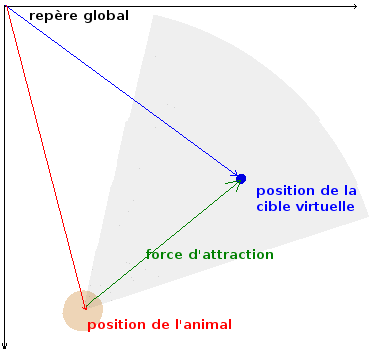
You are now asked to program the randomWalk method which implements steps 4.1 and 4.2 of the Animal::update algorithm
Method randomWalk()
This method will use three new characteristics of the animal, provided by methods, to generate the virtual target:
- the radius of the circle on which the virtual target will be generated (method getRandomWalkRadius() returning the constant ANIMAL_RANDOM_WALK_RADIUS);
- the distance from the center of this circle to the position of the animal (method getRandomWalkDistance() returning the constant ANIMAL_RANDOM_WALK_DISTANCE);
- and a displacement amplification factor of the virtual target (method getRandomWalkJitter() returning the constant ANIMAL_RANDOM_WALK_JITTER).
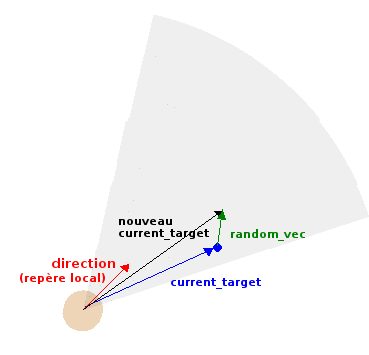
Let current_target be the virtual target pursued by the animal during a simulation cycle (which will be expressed in its local reference frame)
To calculate the value of current_target in the next step you will need to:
- generate a Vec2d random_vec where each component is randomly drawn between -1.0 and 1.0;The method uniform defined in the provided file Random/Random.hpp allows generating uniformly distributed random numbers. The call uniform(-1.0,1.0) should meet your needs here.
- compute current_target += random_vec * getRandomWalkJitter() (see step 2 in the figure below);
- normalize current_target and multiply it by getRandomWalkRadius (current_target is then on a circle with radius ANIMAL_RANDOM_WALK_RADIUS (see step 3 of the Figure below);
- calculate the position of current_target on the circle moved by getRandomWalkDistance(): Vec2d moved_current_target = current_target + Vec2d(getRandomWalkDistance(), 0) (see step 4 of the Figure below);
Let x⃗target be the conversion of moved_current_target in the global reference frame. The force governing the movement is therefore simply x⃗target - x⃗, where x⃗ is the position of the animal.
 |
![[Image: steering, step2]](pictures/desert/random-steering2.png) |
![[Image: steering, step3]](pictures/desert/random-steering3.png) |
- current_target is expressed in the animal's local frame;
- since it needs to be memorized from one time step to another, it is wise to make it a new attribute (initialized to (1,0) for example);
- the larger the constant ANIMAL_RANDOM_WALK_JITTER, the greater the amplitude of the random movement. When this value is zero, the animal generally moves straight ahead.
As we have seen previously, calculating the force of attraction exerted by the virtual target requires knowing its coordinates in the global reference frame. Therefore, a conversion is necessary.
Conversion to global coordinates
Write a method ConvertToGlobalCoord converting a Vec2d expressed in the local frame of reference of an Animal, into a Vec2d in the global frame of reference.
The SFML library provides the necessary tools through the concept of transformation matrices. Let local be a Vec2d expressed in the local coordinate system of an Animal. To convert it to the global coordinate system, it simply needs to undergo a translation to the animal's position and a rotation of γ, where γ is the angle of the animal's direction vector. Using transformation matrices, this is done as follows:
        // create a transformation matrix
       sf::Transform matTransform;

       // first, translate
       matTransform.translate(position_animal);

       // then rotate
       matTransform.rotate(γ);

       // now transform the point
       Vec2d global = matTransform.transformPoint(local);
The translation brings the coordinate system to the level of the animal's position, the rotation allows it to align with the animal's direction. This gives us the animal's local frame of reference. The last instruction allows for the calculation of the global coordinate of the point expressed in this local frame.
Test 8: animal movement completed
You can run the test AnimalTest again as before:
Your program should then behave similarly to what is shown in the short video below:
| Move the mouse and press the 'T' key to create a target in the environment. The only Animal in the environment must wander randomly and when the target enters its field of vision, it must move towards it.
For the test to be correct, the movement in a toric world must be correctly visualizable and pressing the 'R' key must clear the targets. Note that at this stage the animal is still probably displayed as a ghost and the virtual target (blue ball on the yellow circle) is not yet displayed. Some instructions are given below to fix this. | |
| [Video: random movement of an animal with field of vision and target] |
Add this feature to your program which should then display the virtual target in the following format:
- The file Utility.[hpp/cpp] offers you a function buildAnnulus to construct an annulus (like the yellow circle).
- The memorized virtual target (current_target) is the one on the circle before its movement of getRandomWalkDistance(). Keep this in mind when drawing (the drawn circle is the one corresponding to moved_current_Target in the schemes above).
Finally (optional at this stage), if you find your "animal" looks too "vintage video game", you can associate it with the texture given by the constant ANIMAL_TEXTURE.
In order for it to be properly oriented (meaning its field of vision is rather in front of it), you can use the last argument of the function buildSprite. This argument allows the image to undergo a rotation by a given angle.
- Remember the getRotation method.
- The angle must be expressed in degrees for SFML. To convert an angle from radians to degrees, simply divide it by the provided constant DEG_TO_RAD.
Your program should then behave similarly to what is shown in the short video below:
Back to project statement (part 2)